3 Best Trading Journals in 2026 (Free and Paid Compared)
The best trading journals for day trading in 2026: PlanningTrade, TradeZella and TraderSync compared on free plans, broker sync, TradingView workflow and fit.

If you only want the short answer: the three trading journals worth your time in 2026 are PlanningTrade, TradeZella and TraderSync. PlanningTrade is the pick if you want a free trading journal that is built around risk rules and prop-firm style limits. TradeZella is the pick if you want the most polished post-trade analytics and are happy to pay for them. TraderSync is the pick if your priority is that your broker is supported, whatever it is.
The rest of this article explains how we got to that order, what each journal actually does, and which one fits the way you trade.
One thing up front: we build PlanningTrade. So this is a comparison written by one of the three companies on the list. We’ve tried to be straight about where the other two are stronger, because a journal you pick for the wrong reasons is a journal you stop using in three weeks.
What a trading journal needs to do in 2026
The bar has moved. A spreadsheet with entry, exit and P&L was a trading journal ten years ago. Today, if you’re day trading with any volume, you need a tool that does at least four things without you fighting it:
- Imports your trades automatically. If you have to type in twelve trades after a session, you won’t. Broker sync (or at minimum a clean CSV import) is the baseline.
- Tells you something you didn’t already know. Win rate by setup, by time of day, by instrument, by day of the week. The point of journaling is to find the pattern you’re blind to while you’re in the trade.
- Connects to your risk rules. Especially if you trade a funded account. Knowing you broke a daily loss limit yesterday is less useful than being told you’re close to it today.
- Fits into your charting workflow. Most day traders chart on TradingView and execute somewhere else. The journal has to slot into that, not replace it.
Those four criteria are how we ranked the three journals below. Price matters too, but we’ve deliberately put it last, because a free trading journal you don’t open is more expensive than a paid one you use every day.
Quick comparison
| PlanningTrade | TradeZella | TraderSync | |
|---|---|---|---|
| Best for | Risk-first day traders, prop firm evaluations | Deep post-trade analytics | Widest broker compatibility |
| Free plan | Yes, no card required | No (paid plans only) | 7-day free trial |
| Auto-sync | MT4, MT5, cTrader, NinjaTrader, Tradovate | Broker sync, account count depends on plan | Very broad broker and platform list |
| Risk rules | Rule-based, per account, with breach tracking | Risk metrics as analytics | Risk metrics as analytics |
| Backtesting | Unlimited sessions on free plan | Manual and automated, limits depend on plan | Trade replay on higher tiers |
| AI review | AI Coach (monthly allowance on free) | AI credits and agents on paid plans | AI assistant on paid plans |
| Mentor access | Built in | Not listed in public docs | Not listed in public docs |
Pricing changes often enough that we won’t quote numbers here. Each product’s pricing page is linked in its section below; check it before you decide.
1. PlanningTrade: the free trading journal built around risk
PlanningTrade starts from a different question than most journals. Instead of “what happened in your last hundred trades?” it asks “what are your rules, and did you follow them?”
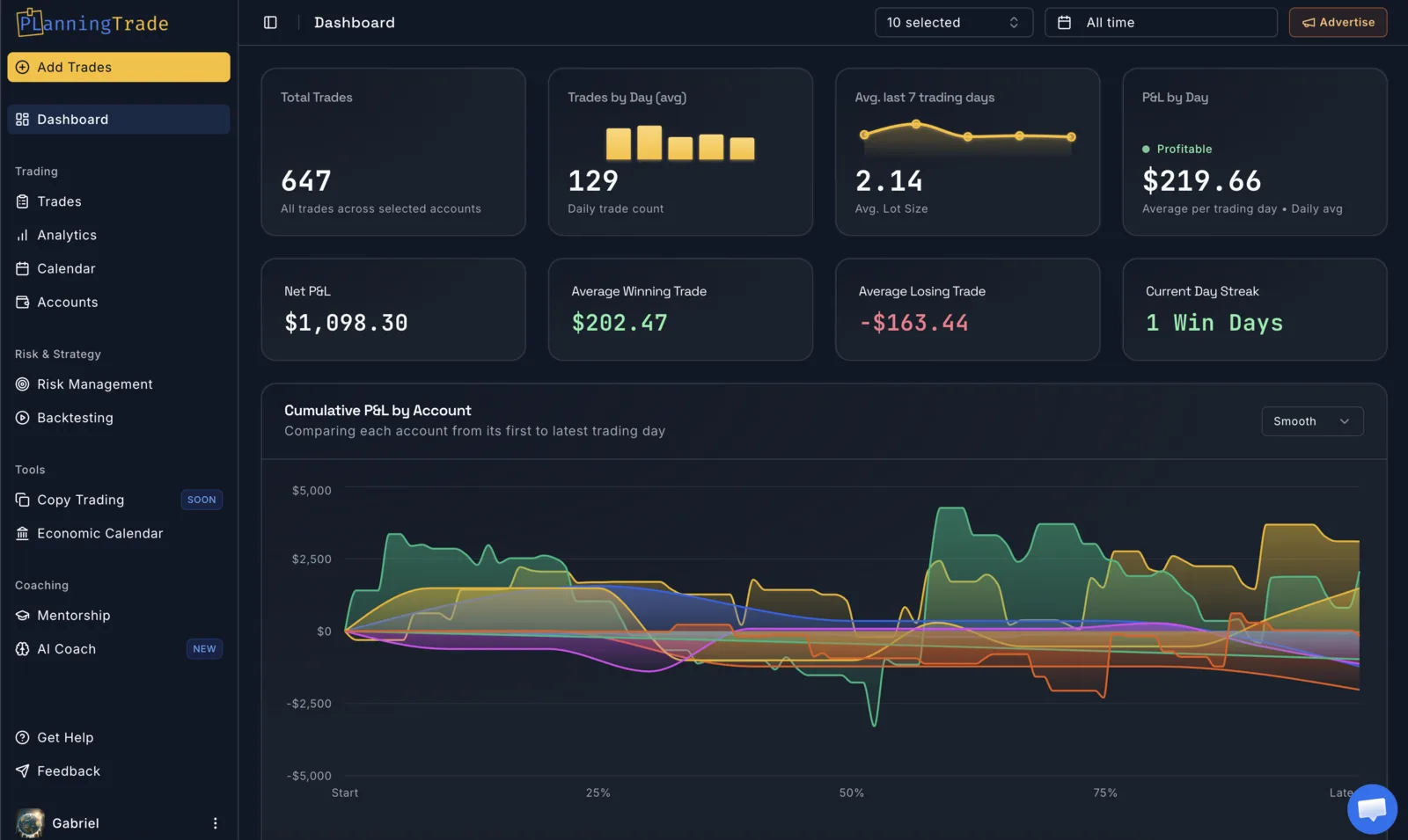
That sounds like a small difference. In practice it changes what the tool is for.
What it does well
Risk management is the core, not a tab. You define rules per account: maximum loss per day, maximum drawdown, risk per trade, and similar limits with comparison operators, so a rule can be “daily loss must not exceed X” or “open risk must stay under Y”. Every synced trade is evaluated against those rules, and breaches are tracked. If you’re trading an FTMO-style evaluation, this is the difference between finding out you failed from the journal and finding out from the prop firm.
Auto-sync that doesn’t get you flagged. PlanningTrade syncs from MT4, MT5, cTrader, NinjaTrader and Tradovate. The sync is designed to be IP-friendly, which matters for prop firm traders whose accounts are monitored for unusual login patterns. If you’ve ever been nervous about handing a third-party tool your investor password, that’s the concern it’s built around.
Backtesting is included on the free plan. You can run unlimited backtesting sessions against imported historical data, with performance analysis on the results. The free plan limits how far back the historical data goes; the Pro plan lifts that. We’ve written more about this in our post on TradingView backtesting alternatives.
Mentor mode. You can give a mentor scoped access to a specific account, with permission controls, so they see the trades and the rules without seeing everything else. If you’re in a mentorship or run one, this removes the weekly “send me your screenshots” ritual.
AI Coach. Once you have enough trades logged, the AI Coach writes a plain-English review of recent trading: where the losses cluster, whether there are signs of tilt, which habits keep showing up. The free plan includes one analysis per month; Pro includes more and adds a chat mode where you can ask questions about your own data.
Where it’s weaker
TradeZella’s dashboards are more polished. If you want to slice performance across a dozen dimensions with beautiful charts, TradeZella does that better today.
The free plan has real limits. As of writing: one trading account, one risk-management configuration, and analytics that cover your latest 50 trades. Older trades are stored, not deleted, but they don’t appear in the free-plan stats. If you run several funded accounts at once, you’ll want Pro.
There’s no direct TradingView import. More on how that works with all three journals below.
Who should pick it
Day traders and prop firm traders who care more about not breaking rules than about pretty charts, and anyone who wants a trading journal free of charge to start with and only pay once they’ve outgrown it.
Start free at app.planningtrade.com, no card required.
2. TradeZella: the best analytics if you’ll pay for them
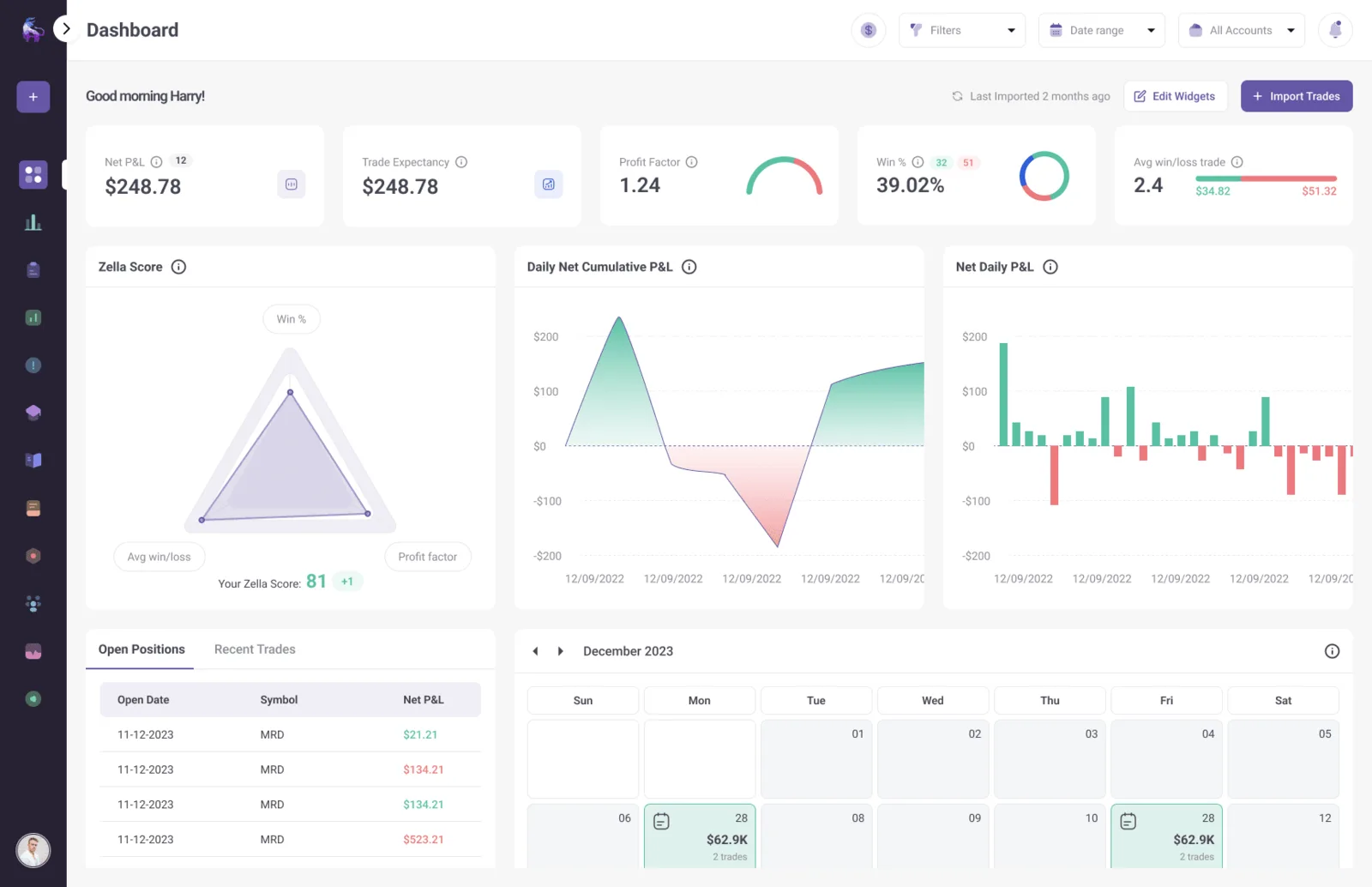
TradeZella is the journal most traders have heard of, and the reputation is earned. It’s a post-trade analytics platform first: you sync or import your trades, and it gives you a very complete picture of what your results look like from every angle.
What it does well
The analytics are the best of the three. Equity curves, performance by time of day, instrument, direction, setup, holding time, and a long list of behavioral breakdowns. The visual design is clean enough that you’ll actually look at it, which is not a small thing.
Backtesting and replay. TradeZella offers manual backtesting on all plans and automated backtest runs on the higher tiers, plus trade replay on the Pro and Ultra plans.
AI features. Paid plans come with a monthly allowance of AI credits, and the Pro and Ultra tiers include AI agents that work over your journal data.
Broker sync scales with the plan. The entry plan syncs one broker account; higher tiers go to fifty or unlimited. If you trade many accounts and want them all in one place, the top tier handles it.
Where it’s weaker
There’s no free plan. TradeZella is a paid subscription with three tiers (Essential, Pro and Ultra at the time of writing). If you’re searching for a free trading journal, this isn’t it. See TradeZella’s pricing page for current numbers.
Risk is reported, not enforced. TradeZella shows you drawdown and risk metrics, but as analytics after the fact. It doesn’t evaluate your trades against a rule set the way PlanningTrade does. For a naturally disciplined trader that’s fine. For someone who breaks their own rules under pressure, it’s the missing piece. We went into this in more depth in PlanningTrade vs TradeZella.
The entry tier is limited. Trade replay and automated backtests are not on the Essential plan, so the “real” TradeZella experience starts at Pro.
Who should pick it
Consistent, already-profitable day traders who want to squeeze more out of an existing edge and have the budget for a premium tool. If your problem is optimization rather than discipline, TradeZella is a very good choice.
3. TraderSync: the safe choice for broker compatibility
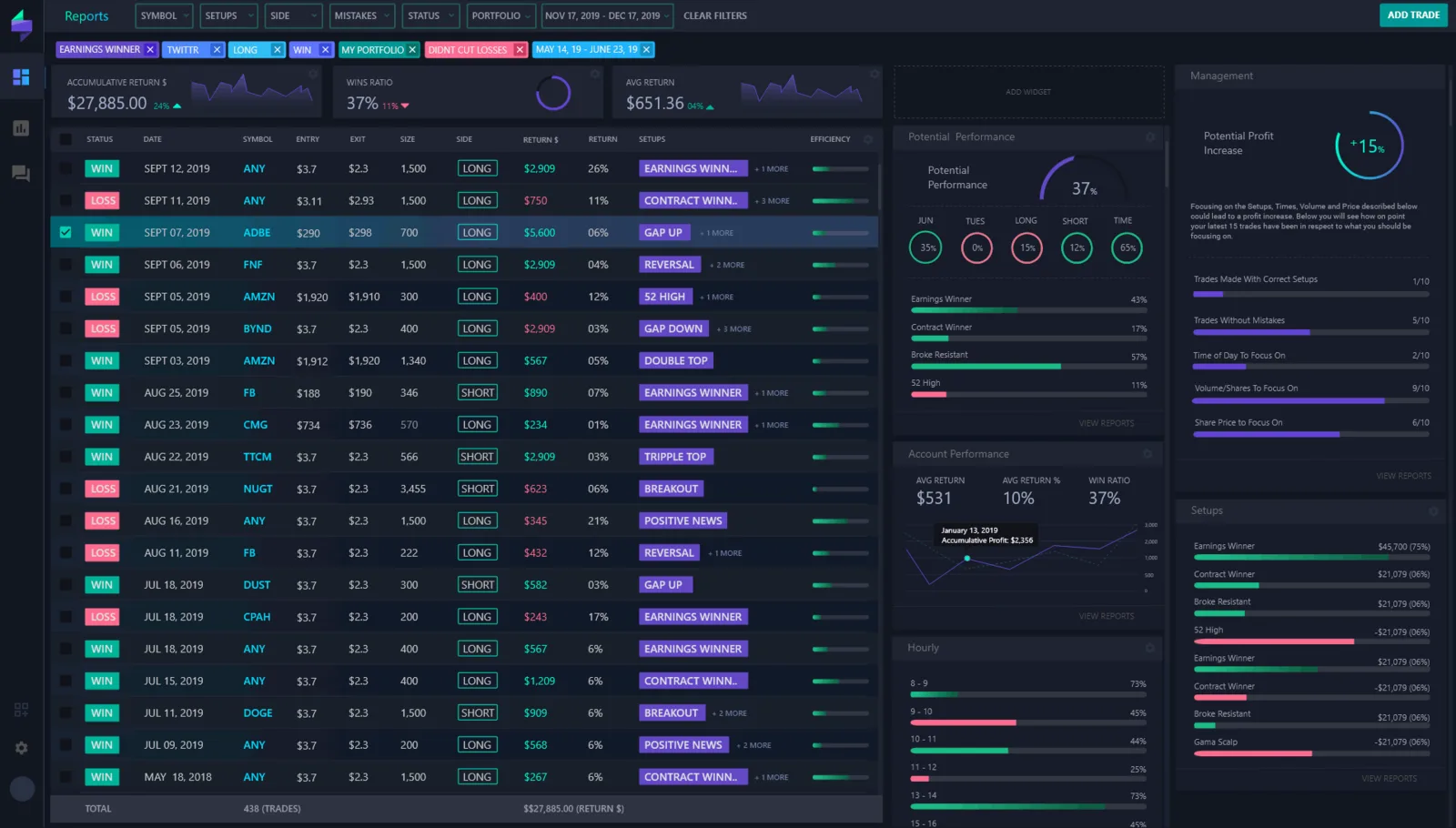
TraderSync has been around longer than the other two and has built its reputation on one thing above all: it probably supports your broker. Stocks, options, futures, forex, crypto; if you have an unusual setup, TraderSync is the one most likely to import it cleanly.
What it does well
Broker coverage. TraderSync’s own marketing and third-party reviews put its integration list in the hundreds. We can’t independently verify the exact count, but in practice it’s the journal we’d point someone to when the other two don’t connect to their platform.
A complete analytics suite. Performance breakdowns by setup and time, a strategy checker, trade chart visualization, and an evaluator on the higher plans for deeper modeling. It’s less visually refined than TradeZella but covers similar ground.
Trade replay and a simulator. Replay is available on higher tiers, and the platform includes a simulator for practicing setups.
Free trial. TraderSync offers a seven-day trial without a card, which gives you enough time to check that your broker imports correctly before paying.
Where it’s weaker
It’s paid after the trial. Like TradeZella, there’s no ongoing free plan. Three tiers (Pro, Premium and Elite) with the AI assistant and replay gated behind the higher ones. Check TraderSync’s pricing for the current structure.
Risk management is analytics, not rules. Same story as TradeZella. You’ll see your drawdown; the tool won’t tell you that you’re one trade away from breaching a daily limit.
The interface shows its age. This is subjective, and some traders prefer a denser layout. But if you’ve used TradeZella or PlanningTrade first, TraderSync feels more like a database and less like a dashboard.
Who should pick it
Multi-asset traders, especially stock and options day traders with a broker the other two don’t support. If import reliability is your first criterion, start here.
How each journal fits a TradingView workflow
This comes up in almost every conversation about trading journals, so it deserves its own section.
TradingView is a charting platform, not a broker. When you place a trade “on TradingView”, the order goes to a connected broker, and that broker is where the trade record lives. So none of these three journals pulls trades from TradingView itself. They pull from the broker or platform your TradingView account is connected to.
What that means in practice:
- If you chart on TradingView and execute on MT4, MT5, cTrader, NinjaTrader or Tradovate, PlanningTrade syncs those trades directly.
- If you execute through a broker in TradeZella’s or TraderSync’s integration list, they import from that broker.
- If your broker isn’t supported anywhere, a CSV export from the broker is the fallback in all three.
The journals don’t replace TradingView’s charts, and they don’t try to. Keep charting where you chart. The journal’s job is to catch what the chart doesn’t show: your behavior.
Which one is right for you?
Choose PlanningTrade if you:
- Trade prop firm challenges or funded accounts and need rules enforced, not just reported
- Want a free trading journal to start with, without a card and without a trial clock
- Trade on MT4, MT5, cTrader, NinjaTrader or Tradovate
- Work with a mentor, or mentor others
- Want backtesting included rather than sold separately
Choose TradeZella if you:
- Already trade consistently and want the deepest analytics available
- Value polished dashboards enough to pay a premium for them
- Want AI agents and automated backtests
- Have the budget for a paid subscription from day one
Choose TraderSync if you:
- Trade stocks, options or a mix of assets on a broker the others don’t support
- Care most about reliable imports
- Want a trial period to test compatibility before committing
Final verdict
We put PlanningTrade first because it’s the only one of the three that is both free to use as an ongoing plan and built around the thing most day traders actually struggle with, which is following their own risk rules. That’s also our product, so weigh that as you see fit.
TradeZella is second because its analytics are genuinely the best of the three, and if you’re past the discipline stage, that’s what you need. TraderSync is third not because it’s bad, but because its main advantage, broker coverage, only matters if the other two don’t connect to your platform.
None of these journals will make you profitable. They show you what you’re doing; changing it is on you. Trading involves substantial risk of loss, and a journal is a review tool, not a guarantee. See our risk disclosure if you want the boring version of that sentence.
If you want to see whether the rules-first approach fits, create a free PlanningTrade account, sync one account, and let it run for a couple of weeks. You’ll know quickly whether it changes how you trade.
FAQ
Is there a genuinely free trading journal in 2026? Yes. PlanningTrade has a free plan with no card required, which includes one synced trading account, one risk-rule configuration, backtesting and a monthly AI review. TradeZella and TraderSync are paid; TraderSync has a seven-day trial.
Does any trading journal connect directly to TradingView? Not in the way people usually mean. TradingView is a charting platform; your trades are held by the broker connected to it. Journals import from that broker. If your broker is MT4, MT5, cTrader, NinjaTrader or Tradovate, PlanningTrade syncs it automatically.
Which trading journal is best for day trading specifically? It depends on the bottleneck. If you break your own rules, PlanningTrade. If you want to analyze a large number of trades in detail, TradeZella. If your broker is unusual, TraderSync.
Can I use more than one? You can, and some traders do: a risk-first journal on the funded account and an analytics tool for deep review. But most traders are better off picking one and opening it every day than paying for two and opening neither.
Do I need auto-sync, or is CSV enough? CSV works if you’re disciplined about exporting after every session. In our experience most people aren’t, which is why every journal on this list pushes automatic import. If your broker supports it, use it.